Invoice by the milestone: per-milestone billing, client proposal actions, and a batch of deal-desk upgrades
You landed the deal. The proposal said Deposit → Milestone → Final — three clean payments across the project. Then reality set in: you draft the deposit by hand, try to remember the milestone invoice when phase two wraps, and hope you don't fat-finger the final amount weeks later while you're heads-down in the work. The proposal knew the payment plan all along. Your invoicing tool just never listened.
Now it does.
TL;DR: Otterdeck now reads the payment schedule in your proposal and bills each milestone as its own invoice — deposit, every milestone, and the final balance, tracked to paid. Every invoice starts as an editable draft you approve before it's sent. Clients can now Accept, Request changes, or Reject a proposal right from the link. And Agency users can save a standard NDA, MSA, or SOW once and send it for signature again and again.
True per-milestone invoicing
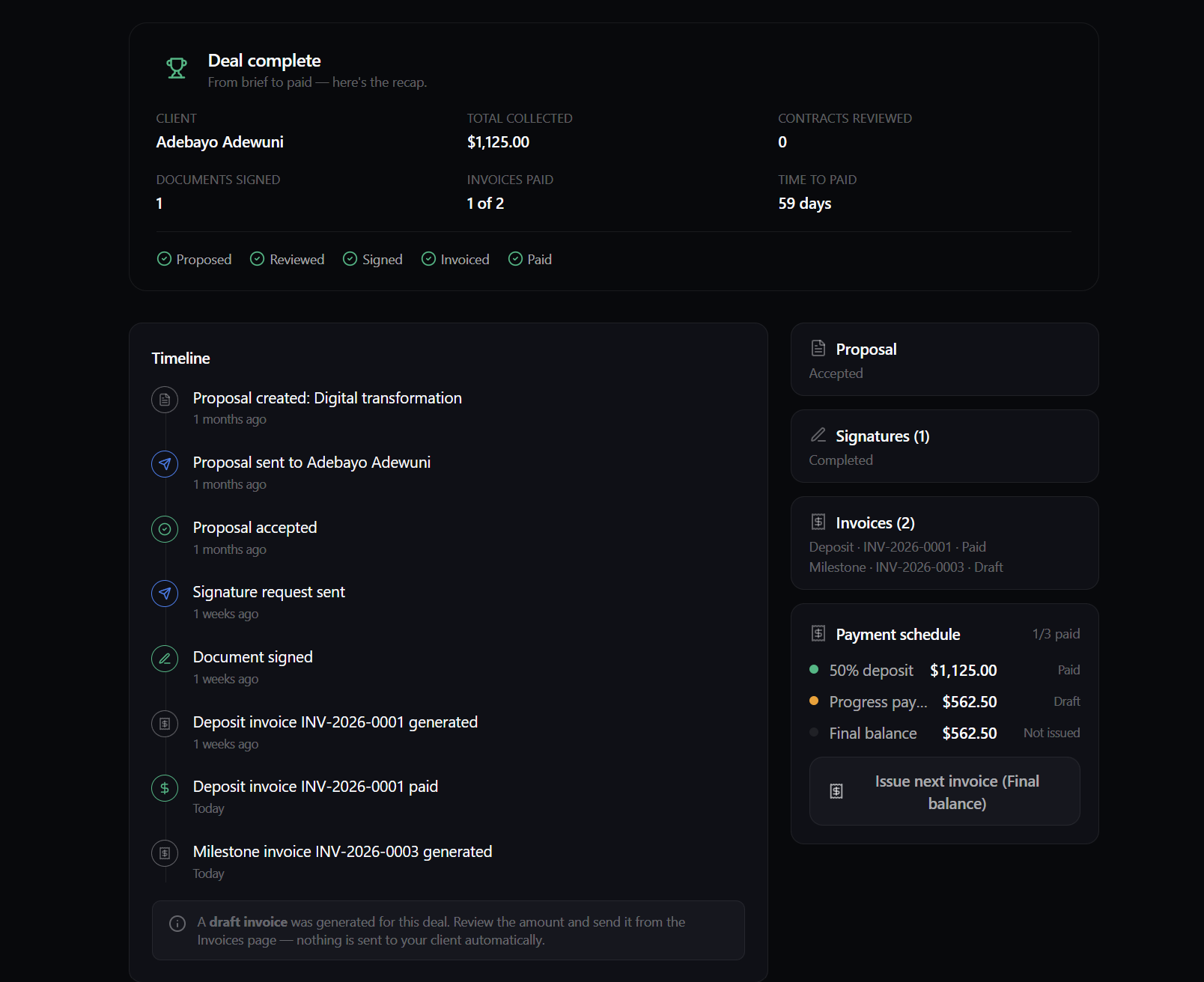
When your proposal has a multi-part payment schedule — say a 40% deposit, a milestone at the halfway mark, and the balance on delivery — Otterdeck now bills each part as its own invoice. Sign the deal and the deposit drafts itself. Mark it paid, and the next milestone's draft appears. Mark that paid, and the final one shows up. Landed a milestone early? Hit Issue next invoice in the deal workspace and bill it now. Deposit-and-balance still works exactly as before; per-milestone is simply there when your schedule calls for it, tax handled, each invoice tracked from draft to paid.
Why it matters. Phased payments protect your cash flow and prove momentum — but manually staging four invoices across a two-month project is where money quietly slips. A brand consultant on a $12,000 identity project (deposit, logo sign-off, final handoff) now sends the deposit on signing, issues the milestone in one click when the logo's approved, and finds the final already staged. Three payments, no spreadsheet, nothing forgotten.
Editable draft invoices
Every invoice Otterdeck generates — on signing or milestone by milestone — starts as a draft. Nothing goes out on its own. Adjust the amount, tax, label, due date, and notes before a single thing reaches your client.
Why it matters. Automation you can't check is a liability. Real projects have late scope tweaks, an agreed discount, a due date the client asked to shift. When a client asks to push a payment to Net-30 and add a line mid-project, you open the draft, edit, and send — ten seconds, and it's right, because you read it before it left. The automation does the heavy lifting; you keep the final word.
Client proposal actions: Accept, Request changes, or Reject
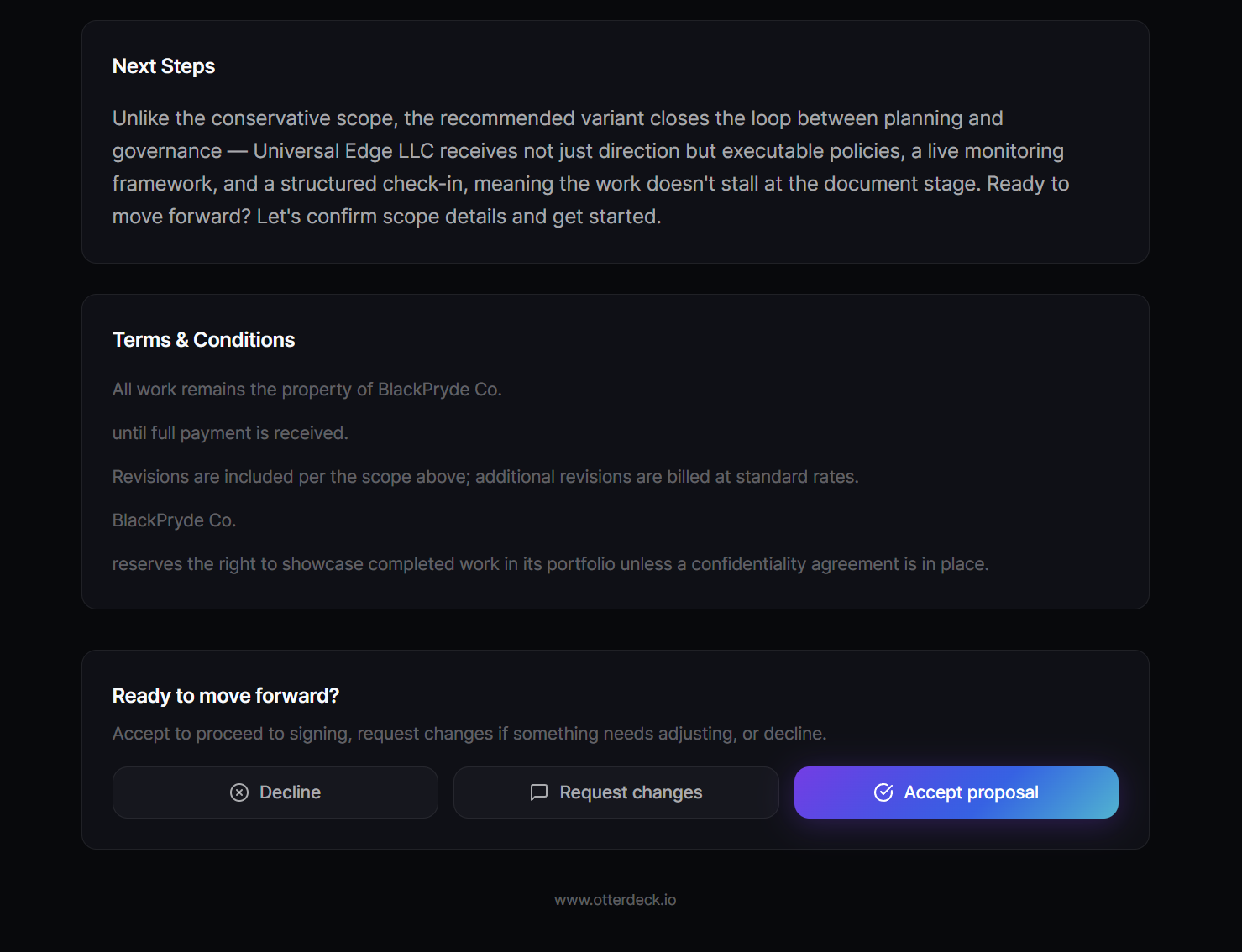
When a client opens your proposal link, they now get three clear choices instead of a silent maybe. Accept moves the deal straight to signing. Request changes lets them leave a note about what they'd like different — which reopens the proposal for you to revise and re-send. Reject captures a reason. You see their notes right on the proposal and can revise and resend, as many rounds as it takes to reach yes.
Why it matters. The worst place a proposal can sit is nowhere — "let me think about it" is where deals die. Now a client can say "almost — change this," and you get the real objection in writing. A fractional CFO's client clicks Request changes on a $50,000 retainer: "Love the scope — can we start with three months instead of six?" She adjusts the term and re-sends that afternoon; the client accepts the next morning. A lost week became a two-message conversation. Use Reject reasons as intelligence, too: a pattern of "too expensive" across deals is telling you something about your positioning.
E-sign template builder (Agency)
Send the same standard document again and again — an NDA, MSA, or boilerplate SOW? Save it once as a reusable template and send it for signature repeatedly, without re-uploading. On Agency, hit Send and the saved template is pre-selected. Every seat sends the current, correct version — no hunting for the latest file in a shared drive, no version drift. The client signs first; you countersign. Otterdeck's built-in e-signature is legally binding, so there's no second tool and no separate signing bill.
Get the most out of these
- Structure the schedule the way you want to be paid. Set the real payment shape before you send — deposit and balance for short jobs, deposit plus milestones plus final for longer ones. The invoicing follows it automatically, so five minutes up front saves the whole back half of the project.
- Request changes for the small stuff, a call for the big stuff. A term tweak or a line-item edit is faster through the loop. A fundamental objection — the whole approach or half the budget — is a conversation; have it, then update the proposal to match.
- Treat every draft as your billing checkpoint. Ten seconds confirming the amount, currency, tax, and due date beats a client emailing back "this doesn't look right." The automation gets you 95% there; the draft is where you own the last 5%.
The rest of the desk
New here? These upgrades sit on top of everything Otterdeck already does to run a deal from brief to paid:
- AI proposals. Describe the client in a few sentences; get three priced proposals — Conservative, Recommended, Premium — so the client chooses up instead of negotiating you down.
- Editor, export & sharing. Edit any section, export a branded PDF, or send a live client link — password-protected with an access code when the pricing's sensitive.
- AI contract review. Upload the client's contract (NDA, MSA, SOW) for a fairness score, clause-by-clause risk in plain English, and suggested redlines — so you sign with your eyes open. It's a risk highlighter, not legal advice, and doesn't replace a lawyer. Try the free contract checker first — no sign-up.
- Built-in e-signature. Legally binding, no second tool, no separate bill. Fully signed → the invoice drafts itself.
- One deal timeline. Proposal, contract, signature, and invoice for a single engagement on one view.
- Analytics. See when a client opens a proposal and which sections they read, plus win rate and revenue per currency.
- Multi-currency. Quote and invoice across fourteen currencies, each with the right symbol and decimals.
- Rate Deck. Not sure what to charge? Our free rate calculator turns the income you want into an hourly, day, project, or retainer rate.
Try it on your next real deal
Build your next proposal with the payment schedule you actually want, send it as a client link, and let the client accept, ask for changes, or push back — right on the page. When it's signed, watch the deposit draft appear, review it, and send. Then bill each milestone as the work lands.
Otterdeck is in beta, so every account gets the full Pro plan free right now — unlimited proposals, all three variants, analytics, invoicing, custom branding, no watermark. Stay with us and you lock in founder pricing for life.
Start a proposal, and run your next deal from brief to paid in one place.