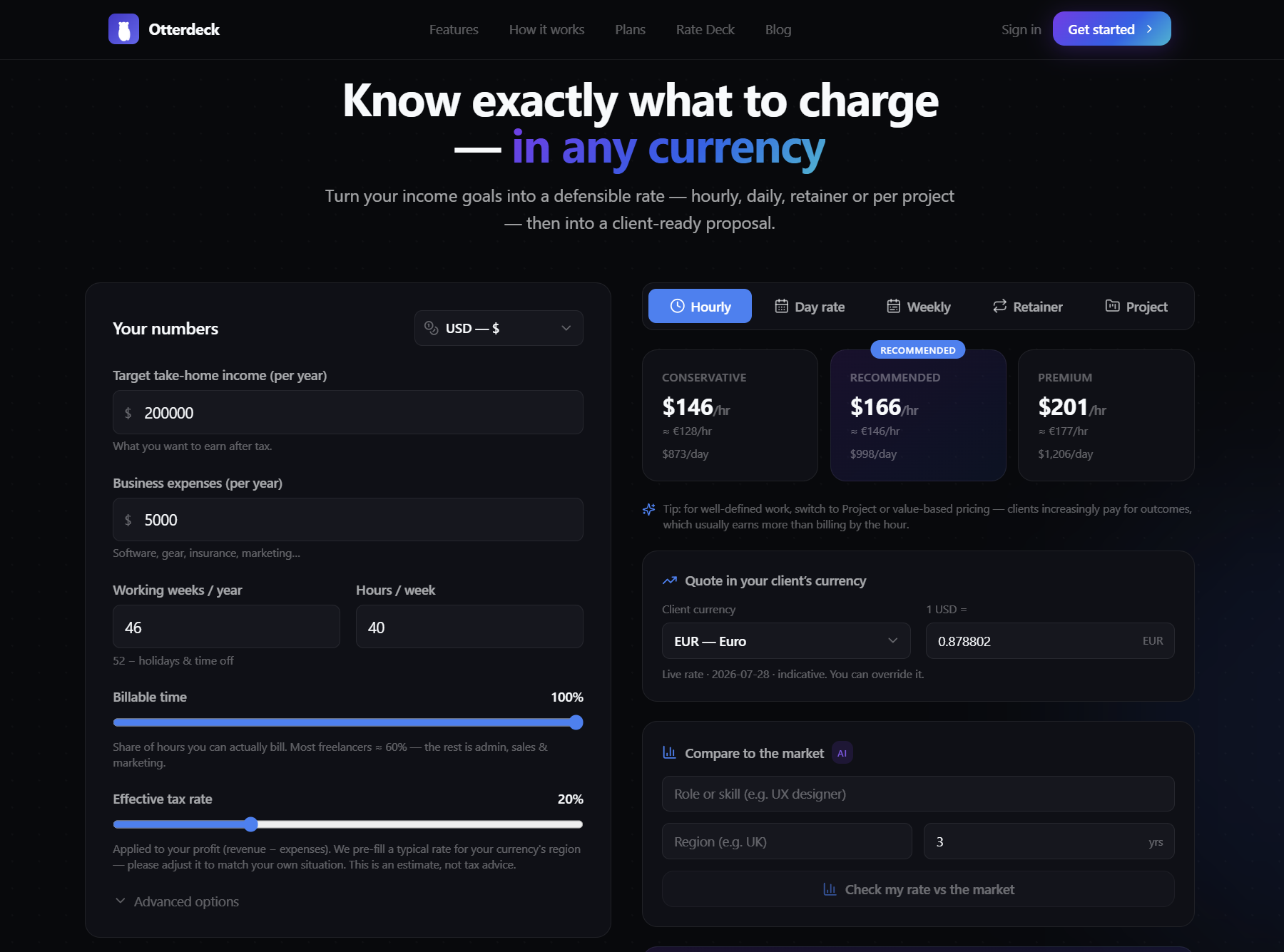
Stop guessing your rate. Rate Deck tells you exactly what to charge.
A freelance rate calculator that works backward from the life you want — across 14 currencies.
Most freelancers set their rate the same way: they think of a number, knock a bit off, and say it out loud before they lose their nerve. Then they charge that for years.
It's a guess dressed up as a decision. And it's usually too low.
Today we're releasing Rate Deck — a free rate and quote calculator from Otterdeck that replaces the guess with math you can defend. No sign-up, no credit card. You can try it right now.
Why freelancers underprice
Two quiet mistakes sit underneath almost every rate that's too low.
The first is pricing as if every hour is billable. It isn't. Between admin, sales calls, invoicing, marketing yourself and the gaps between projects, most independents bill only 50–70% of their working time — a well-known rule of thumb across the freelance economy. Divide the salary you want by 2,000 hours and call it your rate, and you'll earn far less than you planned.
The second is forgetting you're not an employee. No one withholds your tax. No one covers the month a client goes quiet. Your rate has to carry all of it — and if it doesn't, you find out the hard way in January.
Put those together and you get the freelancer's default: undercharging, then struggling to defend even the low number when a client pushes back.
What Rate Deck does
Rate Deck runs the calculation the other way around. Instead of guessing a rate and hoping it adds up, you tell it about the life you want, and it tells you the rate that pays for it.
You enter a few honest numbers:
- The annual take-home income you're aiming for
- Your business expenses
- How many weeks a year you actually work
- Hours per week
- Your billable-time percentage
- Your effective tax rate — which Rate Deck pre-fills for your currency's region as a sensible starting point you can change
Then it does the math. It adds the tax you'll owe on your profit, accounts for the hours you work but can't bill, and gives you back the rate that genuinely funds the life you described. You can see exactly how it's worked out — no hidden steps.
And it doesn't hand you one fragile figure. It gives you a defensible range — three tiers, Conservative, Recommended and Premium — across five pricing models: hourly, day rate, weekly, monthly retainer and project. However a client wants to buy, you already know your floor and your ceiling.
Every feature, and the pain it fixes
Three tiers across five pricing models. Clients don't all buy the same way. Quote an hourly rate, a day rate or a fixed project fee, and know all three trace back to the same honest target.
14 currencies, done properly. USD, EUR, GBP, CAD, AUD, NGN, ZAR, INR, AED, SGD, JPY, KRW, BHD and KWD — with the correct symbols and decimals for each. This isn't a US calculator with a dropdown bolted on. If you bill in naira or dirhams, the numbers behave the way your currency actually behaves.
Live exchange rates. Fetched automatically, with a manual override, so you can quote a client in their currency on the spot. Rates are indicative, but they save you the tab-switching mid-conversation.
AI market benchmark. Enter your role, years of experience and region, and see an AI-estimated view of where your rate sits — low, median and high — plus a coaching tip on pricing for the value you deliver, not just the hours you log.
AI scope estimate. Describe a project in plain language and the AI estimates the hours, deliverables and complexity. The AI estimates the effort — but the price is still worked out straight from your own numbers. Your pricing is never guesswork.
Reverse check. Already have a rate? Type it in. Rate Deck shows the take-home it really implies, and warns you if you're sitting below your own Conservative floor. For a lot of people, that's the uncomfortable, useful moment.
Region tax presets. A sensible starting tax rate for your currency's country, fully editable. (It's a starting point, not tax advice.)
Share via link. Send your scenario to a mentor or peer and ask, "does this look right?"
Save scenarios. Signed-in users can keep and compare setups.
Branded PDF export. A clean, one-page rate sheet you can keep or hand over.
Email me my rates. Get your results in a tidy, branded email so the number doesn't vanish when you close the tab.
Who it's for
Rate Deck is for anyone who sells their own time and has ever hesitated before saying a number out loud: freelance designers, developers, writers and marketers; independent consultants; and small agencies setting a floor for the team. New freelancers use it to set a first rate that isn't a shot in the dark. Experienced ones use the reverse check and find they've been underpricing for two years.
From a defensible number to a proposal that closes
Knowing your rate is the start. Winning the work is the next problem — and it's the one Otterdeck was built for.
Rate Deck is free and needs no account. When you're ready to turn your quote into a full proposal, you carry your numbers straight into Otterdeck, our AI proposal tool for freelancers and consultants. It's free to start. Otterdeck writes the proposal as three priced versions — each with an executive summary, scope, timeline, line-item pricing, payment schedule, terms and optional add-ons — so the client chooses up instead of negotiating you down.
The rate answers "what do I charge?" The proposal answers "how do I win it?" Rate Deck gets you the first. Otterdeck gets you the second.
Try it
Open Rate Deck, enter the income you actually want, and see the rate that pays for it. It takes about two minutes, it's free, and there's no sign-up.
Work out what to charge — free, no sign-up →
FAQ
Is Rate Deck really free? Yes — free to use, no sign-up and no credit card. Signing in only unlocks saving and comparing scenarios. It's the free tool from Otterdeck, our AI proposal generator.
How does it calculate my rate? It works backward from your target take-home income, expenses, working weeks, hours, billable-time percentage and tax rate. It adds the tax you'll owe on your profit and accounts for the hours you can't bill, then shows three tiers across five pricing models. You can see exactly how the number is worked out.
Which currencies does it support? Fourteen: USD, EUR, GBP, CAD, AUD, NGN, ZAR, INR, AED, SGD, JPY, KRW, BHD and KWD — each with correct symbols and decimals, plus live exchange rates so you can quote in your client's currency.
Does the AI decide my price? No. AI helps you estimate a project's scope and hours, and gives an AI-estimated market benchmark. But your price is worked out straight from your own numbers.
Can I turn my rate into a proposal? Yes. Rate Deck is free and needs no account. When you're ready, you carry your numbers into Otterdeck — our proposal tool, free to start — and it writes the proposal as three priced versions.
Is the tax rate accurate for my country? Rate Deck pre-fills a sensible regional starting point, which you can edit. It's a starting figure to make the math realistic, not tax advice — check your own numbers with a professional.